Unpacking the CSDF Standards for Elementary Teachers
Emma Foley
Senior Curriculum Specialist
News
Any time new standards arise, we, as educators, may panic. The first thought that comes to mind is, “when am I going to possibly find time to come up with new lessons to hit these instructional targets?” Luckily, with the rollout of new standards, the state has decided that leading up to 2024, educators across New York State will be able to “capacity build.” Let’s get started with unpacking the CSDF standards for elementary teachers!
What you need to know
The New York State K-12 Computer Science and Digital Fluency Learning Standards (CSDF) were adopted by the Board of Regents in December 2020. These standards are organized into five key concepts: Impacts of Computing, Computational Thinking, Networks & System Design, Cybersecurity, and Digital Literacy. Each concept contains two or more sub-concepts and within the sub-concepts are a number of standards.
As stated on the NYSED.gov website, the vision behind the creation of this new set of standards is that:
Every student will know how to live productively and safely in a technology-dominated world. This includes understanding the essential features of digital technologies, why and how they work, and how to communicate and create using those technologies.
As a result of the pandemic and the general shift in education in recent years, we need to come up with activities that are going to set our students up for success. This applies to not only their post-secondary education, but in their careers as well. Technology has infiltrated all parts of our lives. Exposing young students to different technologies will only increase the likelihood of them feeling prepared and comfortable when they enter the workforce.
The CSTA standards have been the prioritized set of standards until the roll out of these new standards. As of now, CSDF standards are grouped slightly different in the following grade-bands: K-1, 2-3, 4-6, 7-8, and 9-12.
What does the future look like?
The NY State Department of Education has determined a timeline and implementation roadmap to guide educators towards successful implementation of the K-12 CSDF Standards. This deadline is expected to be hit by September 2024. At OTIS for educators, our team of former teachers work hard to put together sample activities to assist educators during this capacity building period. Let’s dive into 5 examples I have put together for my fellow elementary educators!
Impacts of Computing (K-1.IC.1)
If you are looking for easy ELA integration, consider starting with literature (i.e. a read aloud) around letter writing such as Dear Mrs. LaRue by Mark Teague or The Day the Crayons Quit by Drew Daywalt. This could then branch into an open discussion where students compare handwritten letters to email. This is an easy way to help students identify and discuss how tasks are accomplished with and without computing technology!
Impacts of Computing (2-3.IC.1)
One of the silver linings of the pandemic is that now many students have access to their own personal devices (if they didn’t prior to 2020). Another suggestion is to have students design their own app using a program such as MAD-learn. As students create their own app, they shift from being consumers to creators of technology! It also gives students an opportunity to get creative and design an app that they think will be the shining star in a Shark Tank style pitch event at the end of the unit.
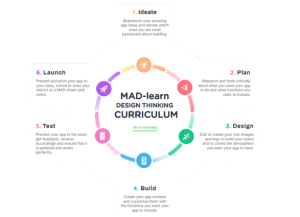
 The MAD-learn Design Thinking Curriculum cycle helps tackle app design in an organized manner, allowing students to appropriately tweak and test creations. MAD-learn has created their own design thinking cycle that walks students through that process. Additionally, this includes a sequenced set of mini benchmarks that will lead to a fully functional app at the end of a 6 or 8 week long unit!
Computational Thinking (K-1.CT.1)
What teacher doesn’t love an opportunity to get students up out of their seats by taking a field trip outside? Consider taking students outside to observe patterns found in nature by exploring types of butterflies or examining pinecones. You could also tie in a multicultural component by learning about origami having students discuss their findings through folding styles of this Japanese art. The goal is to get students to identify and describe patterns and share any similarities they see between nature and man-made designs. For example, having students practice Japanese origami is a great way to tie in a multicultural lesson while thinking about different shapes and patterns.
Computational Thinking (2-3.CT.3)
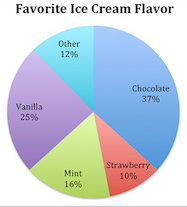
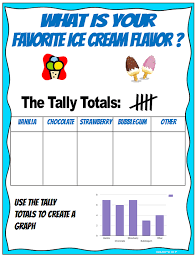
Any PBL unit can end with an opportunity for students to vote on their favorite engineered design. Age-appropriate data collection ideas for our 2nd and 3rd graders include having students show voting results with either a bar graph or pie chart. The main goal is to help our kids see that we can present the same data in multiple visual formats in order to tell a story about the data.
If your students haven’t had much exposure to graphing yet, consider modeling this process. This can include something like a class vote on favorite ice cream flavors or favorite animals. Students can report their results with different types of graphs. This data can be presented as as pie charts, tally charts and, more. Plus, students can play around with different styles and colors.
Network & System Design (4-6.NSD.4)
With new technologies such as circuitry and pocket-sized computers like micro:bit, we might be more prepared for something like a zombie apocalypse. New technology allows students to create anything, not just zombies! Play around with PBL units to incorporate coding and 3D design, with tons of topics from iBlocks. Consider designing a PBL unit that gets students thinking about how design and technology can help survive a zombie apocalypse. This includes elements like making a barricade for shelter (using 3D design or consumables) and communicating with survivors using Morse code.
Learn more about the new standards, example activities, and digital tools on OTIS! Check out the courses on our online professional development platform, OTIS for educators. Be sure to follow me on instagram @emma_edtech. Using the hashtag, #CSforNY, on social media is a great access point for resources during this capacity building period. Be sure to check back for future blogs on addressing the CSDF standards in the middle and high school settings. Remember, we are all in this together leading up to September 2024! #teachersfollowteachers
For more tips, tricks, and tools for teaching in and out of the classroom, check out more content on the Teq Talk blog or our YouTube channels OTIS for educators and Tequipment.
We also offer virtual professional development, training, and support with OTIS for educators. Explore the technology and strategies that spark student success — no matter where teaching or learning are happening!
Follow us on social:
 edteq
edteq  OTIS4educators | Teq Products | iBlocks
  OTIS4educators | MyTeq
  Teq
Teq
0 thoughts on “Unpacking the CSDF Standards for Elementary Teachers”
Related Articles & Other Recommended Reading

Bridging the Gap to Successful Project-Based Learning with Inspirit
There is no better way to complement your Project-Based Learning (PBL) initiatives than by creating engaging and interactive experiences in virtual reality (VR). VR provides users with a computer-generated simulation of a 3D image or environment that can be interacted with in a seemingly real and physical way. Inspirit offers user-friendly, innovative VR headsets that […]

Teq is Headed to FETC!
Teq is off to the 2026 Future of Education Technology Conference (FETC)! Being held from January 11th to January 14th, 2026, this top-notch event is being hosted at the Orange County Convention Center in Orlando, FL! Demo innovative products, grab some swag, or say hello to the team at booth #2730. Tune in to interactive […]

Introducing the New AI Literacy and Instruction Micro-credential!
The landscape of K-12 education is rapidly evolving, driven by the emergence of Artificial Intelligence. Educators and administrators need more than just introductory knowledge; they need a structured, practical path to mastery. We are excited to announce the launch of the AI Literacy and Instruction Micro-credential Playlist! This comprehensive, seven-session video series is designed specifically […]