Introducing Practice Sets in Google Classroom
Nicole Mathew
Curriculum Specialist
News

Have you heard about the newest feature in Google Classroom? You may have noticed a new section in your Classroom dashboard called ‘“practice sets.” Practice sets, exclusive to Google Classroom, are interactive assignments that provide students with real-time feedback. This engaging tool is available for users with the Teaching and Learning Upgrade or Education Plus Google for Education editions.
About Practice Sets
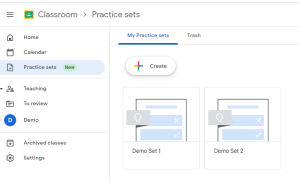
As teachers, we are constantly in need of ways to help our students get the practice they need while gaining valuable insights to help them master course materials. In practice sets, teachers are able to create engaging and interactive assignments that help them do just that. Choose from short response, single-select, or multi-select questions that will automatically grade. Students get real-time feedback and hints along the way to help guide them towards understanding. Longer paragraph response questions can be created as well. Students can ask for hints or use extra help resources curated by the teacher. Ultimately, responses are graded and returned to students after their submission has been received. The amount of points earned can also be adjusted based on the supplemental work that students add in the “show your work” section. In this section, students can also write out, draw, or type their thought process.
Adding in questions and resources
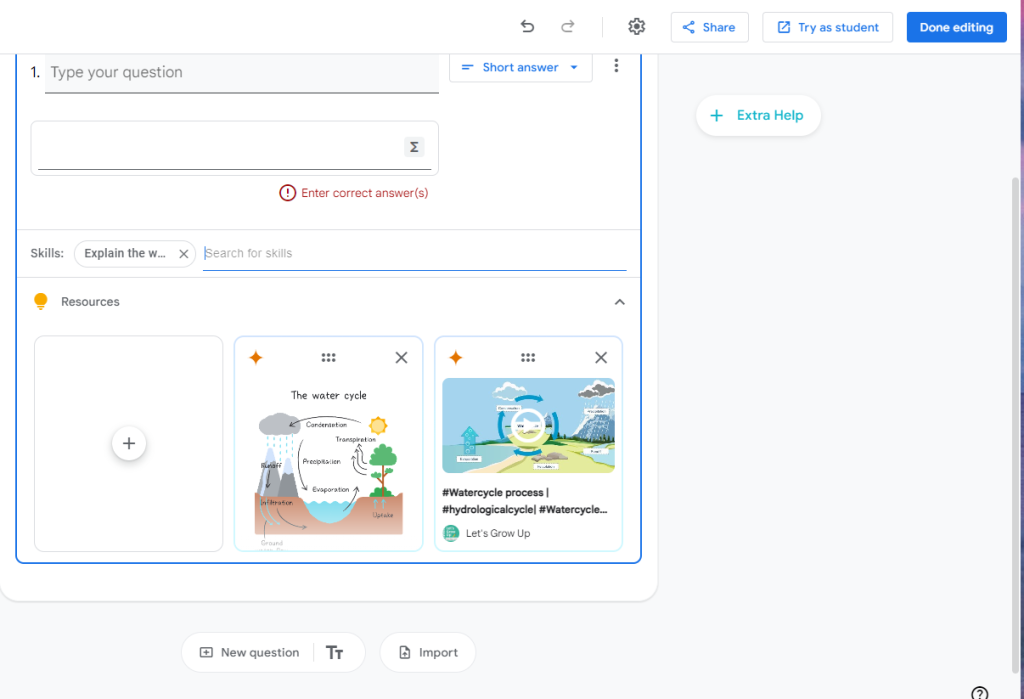
 Once you have added a question and identified the correct answer, search for possible skills by using keywords or phrases and select the best match. Doing so will automatically add resources, typically in the form of YouTube videos or images. Students can use these if they get an answer incorrect or simply need some extra help. You can also add your own resources to the question and remove the generated resources that you don’t think are relevant, for a total of three resources. We always recommend previewing each resource in full to ensure that the material will help students rather than confuse them. You can also add resources to the “get help” section that students can access at any time. When you’re all done adding questions, preview and try out the practice set in student mode. You will be able to interact with the assignment exactly how your students would see it. This feature eliminates the need to test out the assignment with a demo student account in an incognito window!
Assigning sets to students
Then, go into one of the targeted classes and click on the “create” button. Then, add an assignment and choose the practice set as the work product. Fill in the details, select all the classes, and assign away! You can share a link to the assignment posting, including the practice set and any other attachments for other educators in your domain to use. You can also share the link to just the practice set for teachers to customize and make their own assignments.
Once students get started, you’ll see what a game-changer practice sets can be in your formative assessment process, as you can use the analytics and insights to inform future instruction. Students will become more confident as they independently complete practice work with the help of hints and resources, and will receive positive reinforcement through celebratory animations that occur when they get questions right. For more information on practice sets, check out the OTIS course, Introducing Practice Sets in Google Classroom!, as well as our other Google Workspace for Education content.
For more tips, tricks, and tools for teaching in and out of the classroom, check out more content on the Teq Talk blog or our YouTube channels OTIS for educators and Tequipment.
We also offer virtual professional development, training, and support with OTIS for educators. Explore the technology and strategies that spark student success — no matter where teaching or learning are happening!
Follow us on social:
 edteq
edteq  OTIS4educators | Teq Products | iBlocks
  OTIS4educators | MyTeq
  Teq
Teq
0 thoughts on “Introducing Practice Sets in Google Classroom”
Related Articles & Other Recommended Reading

Bridging the Gap to Successful Project-Based Learning with Inspirit
There is no better way to complement your Project-Based Learning (PBL) initiatives than by creating engaging and interactive experiences in virtual reality (VR). VR provides users with a computer-generated simulation of a 3D image or environment that can be interacted with in a seemingly real and physical way. Inspirit offers user-friendly, innovative VR headsets that […]

Teq is Headed to FETC!
Teq is off to the 2026 Future of Education Technology Conference (FETC)! Being held from January 11th to January 14th, 2026, this top-notch event is being hosted at the Orange County Convention Center in Orlando, FL! Demo innovative products, grab some swag, or say hello to the team at booth #2730. Tune in to interactive […]

Introducing the New AI Literacy and Instruction Micro-credential!
The landscape of K-12 education is rapidly evolving, driven by the emergence of Artificial Intelligence. Educators and administrators need more than just introductory knowledge; they need a structured, practical path to mastery. We are excited to announce the launch of the AI Literacy and Instruction Micro-credential Playlist! This comprehensive, seven-session video series is designed specifically […]