4 Ways Canva Visual Aids Can Help SLCN Students
Kasey Campbell
Copywriter
News

Every student learns differently, which means that many educators may have to alter their approach to accommodate students with different needs. One of the best ways to work with students who SLCN that require help with communicating, understanding, and following rules/routines is by using visual aids.
A visual aid is an item, such as an object, picture, or sign that can be used as an alternative mode of communication. There are many available programs for educators to create visual aids. Canva is the go-to tool for educators as it has various pre-made templates and multifaceted tools.
Benefits of visual aids
Visual aids can be useful for adults and children with speech, language, or communication needs (SLCN). They help educators connect ideas to pictures, posters, or charts, allowing students to associate the information that is being taught with those graphics.
1) Structure
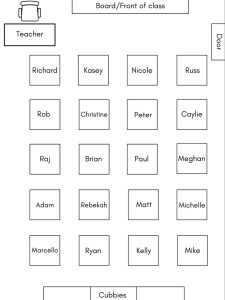
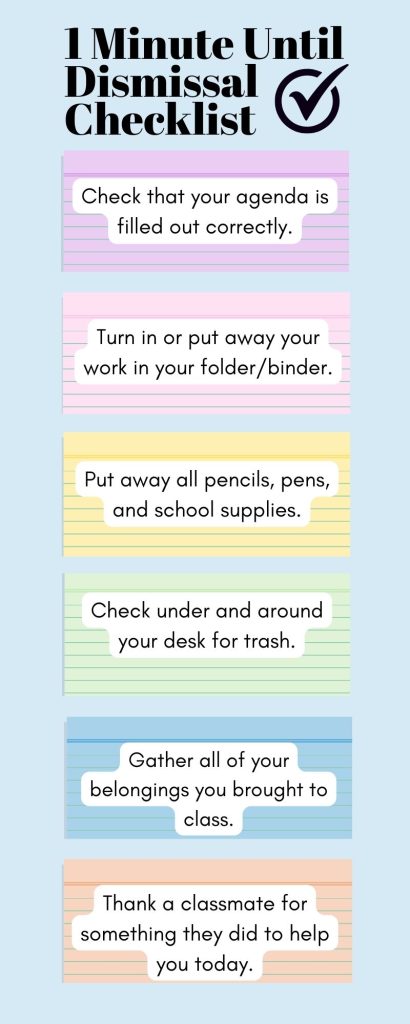
Visual aids can help add structure to a student’s daily routine, as the school day can feel long and dreary. A set structure can help students feel more comfortable and in control of their environment. For example, incorporating “Do Nows” and exit tickets into your daily routine can help students seamlessly transition into the start/end of the school day. You can create seating charts for your classroom as well. Play around with the arrangements in Canva and determine which seating order is most appropriate.
There are various ready-made templates, such as these calendar templates, available in Canva to help students become accustomed to schedules or routines. Use the search bar to search for any template you may need, whether a planner, calendar, or checklist, and input any text to create your visual aid. Plus, you can personalize your creation by switching the colors, changing the font, or adding graphics to make it come together.

2) Communication
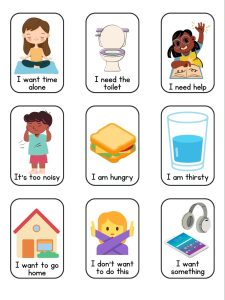
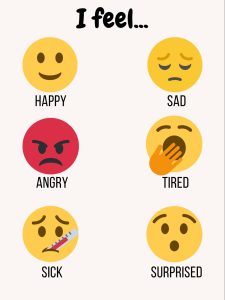
Communicating wants and needs can be difficult for some, especially for those with SLCN. These students may feel frustrated that they cannot say how they feel. Visual aids are an amazing resource for all students to convey their needs, whether it’s a daily feelings check-in or a method of conflict resolution.
In addition to the thousands of templates on Canva, you can start from scratch and create your own visual aid. Pick from various canvas sizes, choose your background colors, text, images, and position them however you like. You can create your own shapes, columns, and boxes to input any information or pictures you deem necessary.


3) Establishing rules
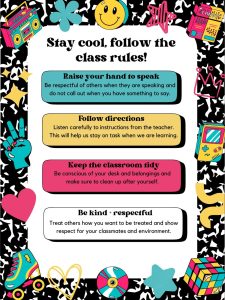
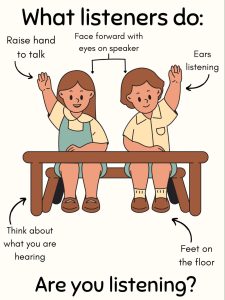
Students, especially those in the K-2 grade band, may not be able to comprehend spoken rules and directions as well as older students. This goes for students with speech and communication needs as well. Creating visual aids for classroom rules and regulations can be effective in helping students follow along, plus it provides them with a little reminder in case they forget.
One of the benefits of Canva is that it is a cost-effective solution for teachers to create their own visual aids, tailored to their students’ needs, instead of outsourcing them. Canva is a free platform, but some of its features are not available to the public without a subscription. Canva Pro, Canva’s premium subscription option, has thousands of additional templates, graphics, fonts, and more for those who really want to amp up their creations.


4) Content-specific help
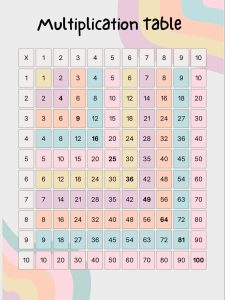
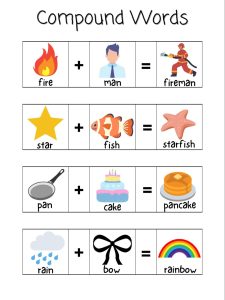
Visual aids can not only be used for speech and communication purposes. They can be incorporated into a variety of topics, such as math, ELA, science, art, social studies, etc. According to the National Council for Special Education, our brains are designed to remember words that are associated with images. Visual aids are super helpful in establishing that concrete information. This can aid in tasks like memorizing vocabulary words, solving math and science problems, or learning about history.
When teaching, perhaps doing a demo of a math equation or science experiment, creating videos are a great option for visual aids in the classroom. Canva provides a free online video editor, if you choose to make your visual aids more animated. The drag-and-drop interface allows you to input your own clips, add audio, animations, and text, and easily download it to your files.

Canva for Education
Canva has recently come out with a teacher-specific subscription, Canva for Education. This option is 100% free! All educators need to do is verify their teaching certification and proof of employment. Canva for Education allows teachers to run activities for students directly through the platform. Users can give feedback, review student content, and even integrate with platforms such as Schoology, Blackboard, Google Classroom, and Microsoft Teams.
With Canva for Education, teachers can create visual aids for students that are completely digital and upload them to their class space for all to see. Students will also have access to the full template library and will be able to create their own visual aids including posters, infographics, study guides, group work templates, and more. See our course on Canva for Education, Canva in the Classroom.
Are you ready to get started making resources for your students? Check out some of our Canva courses on the OTIS platform, such as Designing School Notices with Canva. Don’t forget to explore the Edu Resources section on the site for tons of Canva templates from the OTIS team, like Early Finishers Choiceboard, Class Kindness Jar, and Colorful Emotions!
For more tips, tricks, and tools for teaching in and out of the classroom, check out more content on the Teq Talk blog or our YouTube channels OTIS for educators and Tequipment.
We also offer virtual professional development, training, and support with OTIS for educators. Explore the technology and strategies that spark student success — no matter where teaching or learning are happening!
Follow us on social:
 edteq
edteq  OTIS4educators | Teq Products | iBlocks
  OTIS4educators | MyTeq
  Teq
Teq
0 thoughts on “4 Ways Canva Visual Aids Can Help SLCN Students”
Related Articles & Other Recommended Reading

Bridging the Gap to Successful Project-Based Learning with Inspirit
There is no better way to complement your Project-Based Learning (PBL) initiatives than by creating engaging and interactive experiences in virtual reality (VR). VR provides users with a computer-generated simulation of a 3D image or environment that can be interacted with in a seemingly real and physical way. Inspirit offers user-friendly, innovative VR headsets that […]

Teq is Headed to FETC!
Teq is off to the 2026 Future of Education Technology Conference (FETC)! Being held from January 11th to January 14th, 2026, this top-notch event is being hosted at the Orange County Convention Center in Orlando, FL! Demo innovative products, grab some swag, or say hello to the team at booth #2730. Tune in to interactive […]

Introducing the New AI Literacy and Instruction Micro-credential!
The landscape of K-12 education is rapidly evolving, driven by the emergence of Artificial Intelligence. Educators and administrators need more than just introductory knowledge; they need a structured, practical path to mastery. We are excited to announce the launch of the AI Literacy and Instruction Micro-credential Playlist! This comprehensive, seven-session video series is designed specifically […]