Top 5 Ways to Incorporate Plickers Inside the Classroom
Kelly Mancuso
Curriculum & PD Specialist
News
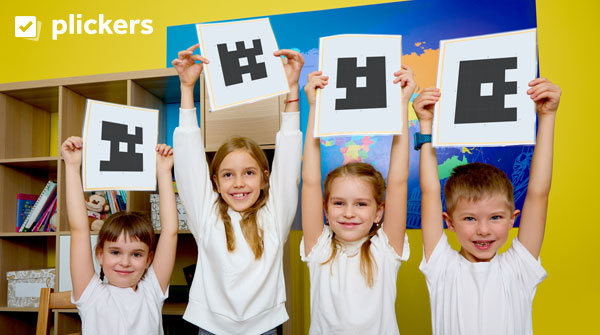
Are you searching for quick and easy formative assessment resources in your classroom? Look no further than Plickers! Plickers, a free formative assessment tool used in the classroom, are paper cards with unique QR codes on them. Students are each given their own Plickers card, which is designed to be held up by the students to answer questions. Teachers will then use a mobile device to scan the cards, which quickly collects and analyzes student responses, resulting in a low-tech yet effective way to engage students and gauge their understanding. Read on to learn about the different ways that you can incorporate Plickers inside the classroom!
1) Real-time formative assessments
Plickers allow teachers to gauge student comprehension instantly. With Plickers, you can create question cards related to the lesson, have students hold up their cards with their selected answers, and use the Plickers app to scan and assess responses in real time. This immediate feedback loop enables on-the-spot adjustments to your teaching strategies and allows teachers to focus on areas that their students struggle in. For example, prior to a math unit test, have students use their Plickers cards to answer a few subtraction problems. Teachers can then focus on areas that students struggle in and provide extra support before students take their unit exam.
2) Peer teaching and collaboration
Foster collaboration and peer teaching by incorporating Plickers into group activities. Have students work together to answer questions and discuss their responses. This not only encourages teamwork but also enhances communication and critical thinking skills. For example, when reviewing for an upcoming test, spice up a trivia game by allowing students to work together in groups! Create questions that offer opportunities for students to collaborate with one another and answer using their Plicker’s cards.
3) Opportunities for classroom polls
Are you having a class party and want students to vote on a theme? Maybe you want to get to know your students a little bit better and see which animal they like best! Plickers makes it fun and easy for students to participate in polls on a variety of topics or ideas. This tool allows teachers to get to know their students on a more personal level, instead of just as a student in their classroom! Plickers also makes it easy for students to answer anonymously, making it an ideal tool for voting on opinions or ideas inside the classroom, so that they can answer honestly without the fear of judgment.
4) Quick check-ins and exit tickets
Use Plickers for quick check-ins at the beginning or end of a lesson! This method provides a snapshot of students’ prior knowledge or what they’ve learned during class. It’s a fantastic way to assess learning progress and identify areas that may need further clarification. For example, before starting a lesson, use Plickers with your students to assess information and background knowledge that they may already have. When you’re finished teaching a lesson, use Plickers to ask students a question containing new content that was just covered. Teachers can assess how well students understood the lesson and use that data to plan future lessons.
5) Data-driven instruction
Leverage the data collected by Plickers to enhance instruction for future lessons. Identify trends, identify gaps or common misconceptions, and tailor your teaching approach accordingly. For example, teachers can use Plickers to assess students’ understanding of addition by collecting data through five different questions. When reviewing the data, teachers may notice that students excel in adding single digit numbers, but struggle when there are double digit addends. Teachers can review the data and use this information to plan more lessons that focus on adding double digit numbers. This will ultimately create a more engaging and effective learning experience for their students.
To learn more about Plickers, its benefits and uses, plus some amazing demos, check out our session, Getting Started with Plickers, available on OTIS for educators.
For more tips, tricks, and tools for teaching in and out of the classroom, check out more content on the Teq Talk blog or our YouTube channels OTIS for educators and Tequipment.
We also offer virtual professional development, training, and support with OTIS for educators. Explore the technology and strategies that spark student success — no matter where teaching or learning are happening!
Follow us on social:
 edteq
edteq  OTIS4educators | Teq Products | iBlocks
  OTIS4educators | MyTeq
  Teq
Teq
0 thoughts on “Top 5 Ways to Incorporate Plickers Inside the Classroom”
Related Articles & Other Recommended Reading

Bridging the Gap to Successful Project-Based Learning with Inspirit
There is no better way to complement your Project-Based Learning (PBL) initiatives than by creating engaging and interactive experiences in virtual reality (VR). VR provides users with a computer-generated simulation of a 3D image or environment that can be interacted with in a seemingly real and physical way. Inspirit offers user-friendly, innovative VR headsets that […]

Teq is Headed to FETC!
Teq is off to the 2026 Future of Education Technology Conference (FETC)! Being held from January 11th to January 14th, 2026, this top-notch event is being hosted at the Orange County Convention Center in Orlando, FL! Demo innovative products, grab some swag, or say hello to the team at booth #2730. Tune in to interactive […]

Introducing the New AI Literacy and Instruction Micro-credential!
The landscape of K-12 education is rapidly evolving, driven by the emergence of Artificial Intelligence. Educators and administrators need more than just introductory knowledge; they need a structured, practical path to mastery. We are excited to announce the launch of the AI Literacy and Instruction Micro-credential Playlist! This comprehensive, seven-session video series is designed specifically […]