The Power of Using Wakelet to Create a Virtual Calming Room
Caylie Gaccione
Curriculum Specialist
News

A virtual calming room is a designated, digital space for students, families, and teachers to find tools and strategies for managing emotions and feelings. You can create a calming room using many different platforms, but one of the most effective and engaging tools is Wakelet. Through Wakelet, you can curate a calming environment and easily edit and adjusted to meet the needs of your audience. Let’s explore what Wakelet is all about and how to utilize it to create a powerful virtual calming room.
What is Wakelet?
Wakelet is a digital platform for curation, sharing, and collaboration. It is a designated space for saving, organizing, and sharing content for free. You can use Wakelet for planning, building virtual learning environments, and generally enhancing student engagement. One of my favorite features of Wakelet is that you can use it for a variety of purposes such as lesson planning, organizing ideas, gathering research, building portfolios, and so much more. It can also be used beyond the classroom. For example, students can use Wakelet to organize their favorite YouTube videos, or you could also use it in your personal life to store recipes that you want to try. The sky’s the limit when it comes to using Wakelet!
Why create a virtual calming room?
Now that we know what Wakelet is all about, let’s dive into what virtual calming rooms are. You may have seen or utilized a traditional calming room or space in your school or classroom before. With a virtual calming room, it is the same concept, but now it can be accessed from anywhere, at any time. Here are some top reasons to try out a virtual calming room:
- Virtual calming rooms can include a range of categories and activities to appeal to the interests of many different people. For example, music, art, general interest, or a mix of multiple categories!
- Can be utilized to enhance student behaviors, achievements, attitude towards learning, and overall classroom community
- We aren’t always privy to knowing exactly what is going on in our students’ lives outside of school hours, so a calming room can be a launching pad for discussion, especially since it can be accessed from home, school, and beyond.
- Helps with focus and brain breaks which can be done throughout the day.
- All resources are curated in one space – there are so many ideas out there and this compiles them all.
- Takes the guesswork out of stress management – some students may not know what to do in moments of stress, so having multiple resources can give them a sense of security.
- Students can remain anonymous – they can express themselves in a designated, safe space.
How to create your Wakelet calming room
It is now time to set up your virtual coming room on Wakelet! Here are some quick ways to start:
Consider what type of calming room you want to create – who is your target audience? what categories do you want to include? etc. A virtual calming room does not need to include all of these components. You can adjust categories and activities based on what your students need. Possible categories include:
-
- Sounds and music
- Meditation and visual relaxation
- Yoga and mindfulness
- Art and creativity
- Time management and productivity
- Inspiration
- Live animal cams
- Virtual tours
- Puzzles and games
- Movement and exercise
How to use available tools within Wakelet
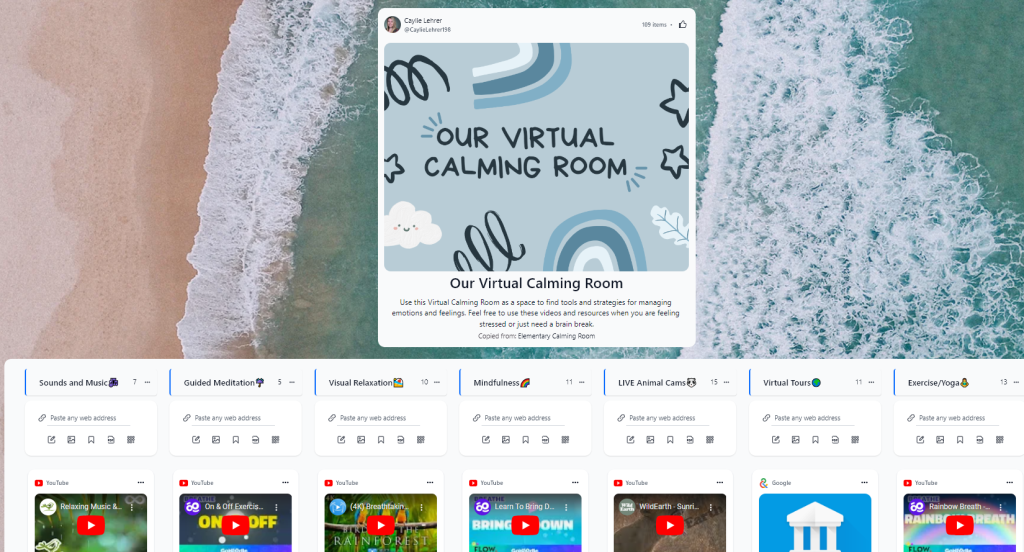
You can use the “Search” tool for inspiration and the “Explore” tool to find collection templates to get you started. Choose the “Create a Collection” icon to build one from scratch or use one of the saved collections from your search. This is where you will really start building your calming room! Give your collection a title & description, edit the design, choose a header & background image, and choose the layout – all using the “Design” icon. Add applicable content through links, text, images, and integrated apps (i,e, YouTube videos, Flip, Adobe Express, etc.). Remember that your virtual calming room can look however you want and can include unique tools and features. Be creative when adjusting your cover and background image (hint: there is a great Canva integration on Wakelet), as well as customizing your categories and even engaging students by adding emojis! Here is a peek at my customized calming room:
I hope that this gives you some inspiration for creating your own virtual calming rooms using Wakelet. Remember to try it out and share your collections with us! Be sure to check out our accompanying OTIS course, Creating Virtual Calming Rooms with Wakelet, as well as many other Character Building courses in the OTIS Course Library.
For more tips, tricks, and tools for teaching in and out of the classroom, check out more content on the Teq Talk blog or our YouTube channels OTIS for educators and Tequipment.
We also offer virtual professional development, training, and support with OTIS for educators. Explore the technology and strategies that spark student success — no matter where teaching or learning are happening!
Follow us on social:
 edteq
edteq  OTIS4educators | Teq Products | iBlocks
  OTIS4educators | MyTeq
  Teq
Teq
0 thoughts on “The Power of Using Wakelet to Create a Virtual Calming Room”
Related Articles & Other Recommended Reading

Bridging the Gap to Successful Project-Based Learning with Inspirit
There is no better way to complement your Project-Based Learning (PBL) initiatives than by creating engaging and interactive experiences in virtual reality (VR). VR provides users with a computer-generated simulation of a 3D image or environment that can be interacted with in a seemingly real and physical way. Inspirit offers user-friendly, innovative VR headsets that […]

Teq is Headed to FETC!
Teq is off to the 2026 Future of Education Technology Conference (FETC)! Being held from January 11th to January 14th, 2026, this top-notch event is being hosted at the Orange County Convention Center in Orlando, FL! Demo innovative products, grab some swag, or say hello to the team at booth #2730. Tune in to interactive […]

Introducing the New AI Literacy and Instruction Micro-credential!
The landscape of K-12 education is rapidly evolving, driven by the emergence of Artificial Intelligence. Educators and administrators need more than just introductory knowledge; they need a structured, practical path to mastery. We are excited to announce the launch of the AI Literacy and Instruction Micro-credential Playlist! This comprehensive, seven-session video series is designed specifically […]